You are on the road and want to buy the QueerCityPass Cologne from your cell phone? Choose the app that suits you, buy your QueerCityPass Cologne and you can hop right on the public transport and go!
You can choose between the KVB app and the myGO app.
To find your QueerCityPass quickly, follow these steps:
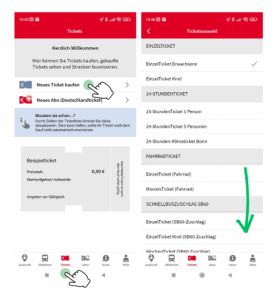
- Open the KVB app
- Select “Tickets” in the bottom menu bar
- Click on “Buy new ticket”
- Click on the selection arrow in the “Type” field
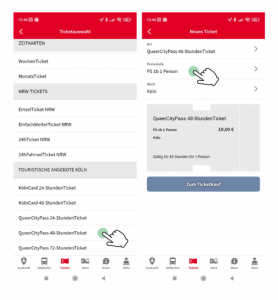
- Scroll down to “Cologne tourist offers”
- Select your QueerCityPass Cologne
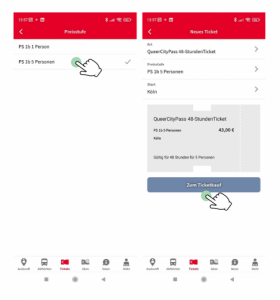
- In the “Price Level” field, select whether you are traveling with 1 person or 5 people
- Click on “To Ticket Purchase” to complete the purchase process
- Use your QueerCityPass for public transportation
- Save money with our tourist offers
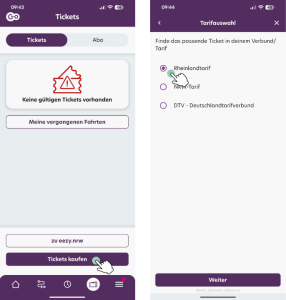
- Open the MyGo app
- Tap the “Tickets” button
- Select “RHEINLANDTARIF” and tap “Continue”
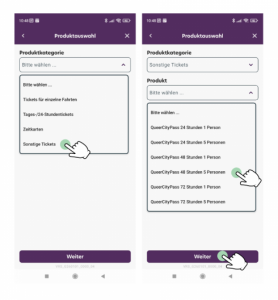
- Select “Other tickets” in the product category field
- Then you can select your QueerCityPass Cologne in the “Product” field
- Click on the shopping cart icon to proceed to checkout
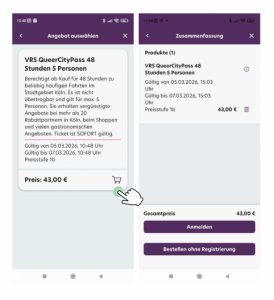
- Complete the purchase process and explore Cologne with your QueerCityPass Cologne!